
Crisper Humidity Guide1.2 - Get APK
You'll be able to download in few seconds.
Publisher Description
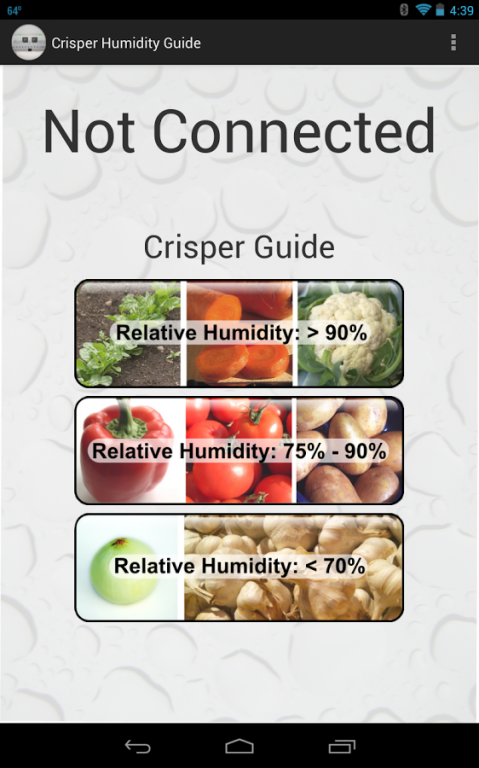
This app uses the humidity and temperature sensors in the Sensordrone to monitor the relative humidity in your refrigerator's crisper.
www.sensorcon.com/sensordrone/
If used correctly, the crisper in your refrigerator can keep produce fresh for longer periods of time. To do this, the relative humidity in the crisper has to be at an appropriate level for the type of produce being stored. Most crispers only have high, medium, and low settings which do not really tell you much. The humidity can constantly change just from adding and removing produce. Using this app, you can place the Sensordrone in your crisper and view the relative humidity in real time. You can then make adjustments to the level and get it exactly where you want it. The app also provides basic information on what types of produce stay fresh in certain humidity ranges.
If you have trouble getting your humidity up to 80% or higher, you may not have enough produce stored in it. It is recommended to keep it at least half full with fresh leafy greens and vegetables for the high humidity setting. Make sure they are not in a package or covered in plastic. The vegetables will provide moisture to increase the humidity. Even at half full, it may not reach 90%. In this case, you will likely want to make sure it is almost completely full. If this does still not work, you can rinse your veggies before you put them in, and this will also add to the moisture in the crisper. And make sure to only open it when you need to take something out or put something in, and close it quickly.
About Crisper Humidity Guide
The company that develops Crisper Humidity Guide is Sensorcon, Inc.. The latest version released by its developer is 1.2.
To install Crisper Humidity Guide on your Android device, just click the green Continue To App button above to start the installation process. The app is listed on our website since 2014-01-17 and was downloaded 0 times. We have already checked if the download link is safe, however for your own protection we recommend that you scan the downloaded app with your antivirus. Your antivirus may detect the Crisper Humidity Guide as malware as malware if the download link to com.sensorcon.crisperhumidityguide is broken.
How to install Crisper Humidity Guide on your Android device:
- Click on the Continue To App button on our website. This will redirect you to Google Play.
- Once the Crisper Humidity Guide is shown in the Google Play listing of your Android device, you can start its download and installation. Tap on the Install button located below the search bar and to the right of the app icon.
- A pop-up window with the permissions required by Crisper Humidity Guide will be shown. Click on Accept to continue the process.
- Crisper Humidity Guide will be downloaded onto your device, displaying a progress. Once the download completes, the installation will start and you'll get a notification after the installation is finished.
Program Details
System requirements
Download information
Pricing
Version History
version 1.2
posted on 2014-01-17
Some small bug-fixes.
version 1.1
posted on 2013-05-28
Several fixes and updates
Disclaimer
External Download
We do not host Crisper Humidity Guide on our servers. We did not scan it for viruses, adware, spyware or other type of malware. This app is hosted by Galad and passed their terms and conditions to be listed there. We recommend caution when installing it.
The APK Download link for Crisper Humidity Guide is provided to you by apps112.com without any warranties, representations or guarantees of any kind, so access it at your own risk.
If you have questions regarding this particular app contact the publisher directly. For questions about the functionalities of apps112.com contact us.
